Logitech MX Master 3S Review: Black 910-006556 Standard Edition
Exact-item source-based review for productivity use
Bottom line
The evidence supports the receiver-included Black `910-006556` package identity and three-host Options+ workflow.
Logitech MX Master 3S Review: Black 910-006556 Standard Edition
Reviewed: 2026-09-19
Direct answer
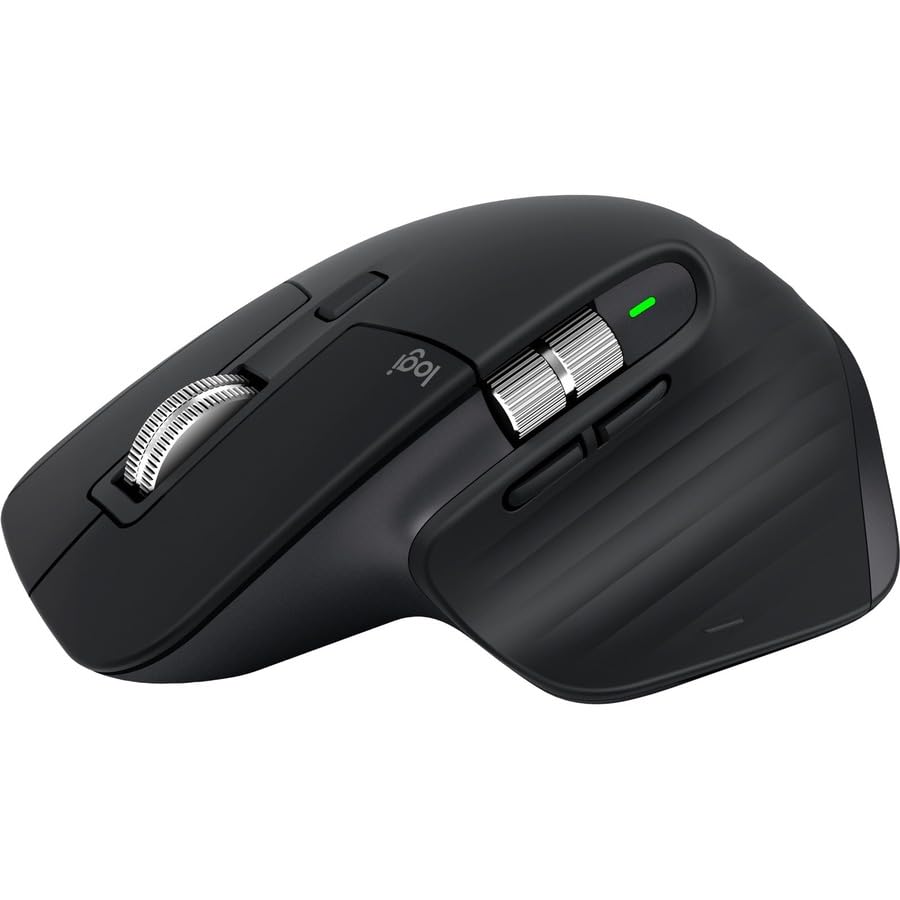
The exact subject is the Black Logitech MX Master 3S Standard Edition, part 910-006556, UPC 097855174819, with an included USB-A Logi Bolt receiver.[2][3]
It is suited to right-handed desktop productivity when two scroll wheels, configurable controls, and Bluetooth Low Energy or Bolt connectivity match the buyer's workflow.[2][5][7]
It is a weaker fit for smaller hands, frequent travel, left-handed use, or gaming-first workloads.[5]
This source-based review does not substitute for trying the shape in your own hand.
Exact model and package
Logitech identifies the mouse model as MR0077 and the Standard Edition package as the mouse, a Logi Bolt USB receiver, a USB-A-to-USB-C charging cable, and documentation.[2]
The Logitech retail sheet identifies Black part 910-006556 and UPC 097855174819, which Micro Center independently matches.[3][4]
Micro Center labels the included receiver as Unifying USB Receiver, while Logitech identifies it as Logi Bolt; this review follows Logitech for the package type.[2][4]
The live U.S. product page for part 910-007500 identifies a Bluetooth Edition, so it is not used as the destination for receiver-included part 910-006556.[2][3][15]
Graphite 910-006557, Pale Gray 910-006558, MX Master 3S Bluetooth Edition, MX Master 3S for Mac, MX Master 3S for Business, MX Master 3, and MX Master 4 are outside this exact Black 910-006556 package boundary; their evidence is not used where identity matters.
Methodology and limitations
One Big Review evaluated public manufacturer documentation, a manufacturer retail sheet, a retailer identifier record, independent review evidence, software-support pages, a privacy policy, and the U.S. CPSC recall dataset.
We did not buy, handle, measure, latency-test, battery-test, durability-test, or otherwise perform hands-on testing of this mouse.
Manufacturer statements are labeled as such, while independent observations are attributed to the reviewed unit.
Current availability, current price, exact-SKU warranty terms, long-term coating durability, battery replacement, and repairability remain unresolved.
Controls and software
Logitech specifies seven customizable buttons, a smart-shift main wheel, a thumb wheel, and a gesture button.[2]
Logitech's setup page documents ratchet and free-spin wheel modes and says Options+ can change SmartShift behavior and sensitivity.[7]
The same setup page says Options+ enables gestures, app-specific button assignments, and manual customization for applications.[7]
The current Options+ page describes app-specific customization, gestures, pointer and scrolling settings, Smart Actions, and Flow.[14]
These are software-layer capabilities rather than a claim that every feature works without Options+.[7][14]
Connectivity and multi-device use
The Standard Edition supports Bluetooth Low Energy and the included USB-A Logi Bolt receiver.[2]
Logitech says Easy-Switch can pair the mouse with up to three computers and change the active channel.[7]
Logitech says Flow can move the cursor and copy and paste between computers, and its setup page requires Options+ on both computers.[7]
Logi Bolt and Unifying receivers are different systems and cannot pair with each other's products.[8]
Tom's Hardware identifies the device-switching button as bottom-mounted.[6]
Logi Options+ support and privacy
As accessed on 2026-09-19, the canonical current U.S. Logi Options+ page lists Windows 10 or later and macOS 14 or later.[14]
That current requirement is separate from Logitech's launch-era record of Windows 10 or 11 and macOS 10.15 or later.[2][14]
This review does not promise full Options+ features on Linux, ChromeOS, iPadOS, iOS, or Android.[2][14]
Logitech's broad privacy policy, last updated September 2026, says certain product and service use may send device, operating-system, identifier, network, settings, usage, and diagnostic data.[9]
The policy does not establish that every listed category is collected in every Options+ session.[9]
Logitech says its offline Options+ build cannot send or receive data such as analytics or firmware status, but that build omits Logi Account access, Flow, backup and restore, and Smart Actions.[10]
Logitech's macOS support page names Accessibility, Input Monitoring, Bluetooth, USB Accessories, Login Items, and Screen & System Audio Recording permissions for relevant features.[11]
The same page says a permission can be skipped when its related feature is not used.[11]
These software, privacy, and permission details are time-sensitive and should be rechecked before installation.
Fit and tradeoffs
Logitech specifies dimensions of 124.9 by 84.3 by 51 millimeters and a weight of 141 grams.[2]
RTINGS tested a Graphite Standard Edition rather than this Black SKU and describes the family shape as right-handed, fairly bulky, poorly suited to smaller hands, and lacking receiver storage.[5]
Those observations support a fit caution, not a medical, posture, pain-reduction, or injury-prevention claim.
The charging cable supplies power through USB-C, but Logitech classifies the product as wireless.[2]
RTINGS describes the MX Master 3S changes from the prior MX Master 3 as quieter click buttons, a wider-range sensor, and a move from the older Unifying receiver to Bolt.[5]
Logitech's current MX Master 4 page documents haptic feedback and Actions Ring features, but this article does not attempt a full comparison.[12]
Gaming suitability
RTINGS says the MX Master 3S is not intended for FPS gaming and cites its weight, click latency, and sensor intent as limitations.[5]
That supports a gaming-first avoidance note, not a claim that the mouse cannot run games.
Recall check and unresolved evidence
A case-insensitive search of all 10,054 rows in the official U.S. CPSC recall CSV downloaded on 2026-09-19 found zero matches for MX Master 3S, 910-006556, 097855174819, or Logitech.[13]
The bounded result is that no matching U.S. CPSC recall was found in that downloaded dataset as of 2026-09-19.[13]
That result is not proof of global recall absence, future recall status, or product safety.
No definitive repairability, battery-replacement, maintenance, or exact-SKU warranty claim is made because the reviewed evidence was not strong enough.
Verdict
The evidence supports the receiver-included Black 910-006556 package identity and three-host Options+ workflow.[2][3][7]
Its right-handed family shape and configurable controls suit desktop productivity when those traits match the buyer's workflow.[2][5][14]
Confidence is moderate because identity and core functions are well documented, but fit observations come from another color of the Standard Edition and One Big Review performed no hands-on testing.[3][5]
Skip it if you need a left-handed shape, a compact travel mouse, a gaming-first mouse, easy top-side host switching, or a verified current commercial destination.[5][6][15]
Update this review if Logitech changes Options+ requirements or privacy disclosures, if exact-SKU warranty or repair evidence appears, if recall data changes, or if an exact neutral destination is verified.
Sources
- Logitech Support: Specification - MX Master 3S : source, accessed 2026-09-19
- Logitech MX Master 3S retail specification sheet : source, accessed 2026-09-19
- Micro Center: Logitech MX Master 3S Black : source, accessed 2026-09-19
- RTINGS Logitech MX Master 3S review, archived 2026-08-30 : source, accessed 2026-09-19
- Tom's Hardware: Logitech MX Master 3S Mouse Review : source, accessed 2026-09-19
- Logitech Support: Getting Started - MX Master 3S : source, accessed 2026-09-19
- Logitech Support: Bolt and Unifying receivers : source, accessed 2026-09-19
- Logitech Privacy Policy : source, accessed 2026-09-19
- Logitech Support: Options+ offline installer : source, accessed 2026-09-19
- Logitech Support: Logi Options+ permissions on macOS : source, accessed 2026-09-19
- Logitech MX Master 4 product page : source, accessed 2026-09-19
- U.S. CPSC recall listing CSV : source, accessed 2026-09-19
- Logi Options+ Software | Logitech : source, accessed 2026-09-19
- Logitech MX Master 3S Bluetooth Edition 910-007500 : source, accessed 2026-09-19